Put an AI assistant inside your AcelleMail.
RelyAI adds a knowledge-grounded chatbox, an optional action-taking agent, universal rewrite, subject-line A/B generation and four task coaches to AcelleMail — with feature flags, quotas, a permission matrix and a full audit trail so you stay in control of every call.
Usage · Audit · Feedback
OpenAI · Anthropic · Ollama
Deliverability · Segment · Campaign · Form
Lists · Campaigns · Automations
No token markup
Simple, transparent licensing
One license per AcelleMail installation. You bring your own AI provider key, so there's no per-token markup — ever.
Leased License
Yearly plan with continuous updates
- One AcelleMail installation
- All features & reports
- One-click auto-updates
- Email & ticket support
Lifetime License
Pay once, own it forever
- One AcelleMail installation
- All features & reports
- 1 year free support & updates
- Email & ticket support
Nine capabilities, one plugin, zero core edits
Every surface below is a flag you can switch on or off from the admin — no redeploy, no code changes, no forked AcelleMail.
Knowledge-grounded chatbox
A floating chat bubble for your customers that answers from the bundled knowledge base. Read-only by default — it never invents URLs and never claims to have done something it hasn't.
Agent chat with tool use
Upgrade the chatbox into an agent that creates lists, builds automations from presets, tags subscribers and drafts campaigns — every destructive step behind an explicit confirm.
Universal rewrite (✦)
Select any text anywhere in the customer UI and a sparkle popover offers six intents — improve, shorten, expand, fix grammar, formal, friendly. Also embeddable as a Blade component.
Subject-line A/B generator
A “Suggest” button next to every subject field produces distinct variants tagged by angle — curiosity, benefit, urgency, question, number, personalization. Click one to fill the field.
Four task coaches
Deliverability, segment, campaign and form coaches appear as launcher chips on the pages where they matter, returning contextual tips with a confidence score.
Six admin dashboards
Usage, Conversations, Audit, Feedback and Self-Improve — per-task runs, success rate, P95 latency, trace IDs, destructive-op filters and CSV export, all charted with AcelleMail's own ECharts build.
Brand voice, three tiers
Set adjectives, forbidden words and a voice sample globally; users can override for themselves. Forbidden terms are struck out after generation, not just requested in the prompt.
Appearance controls
Five colour themes, four launcher positions, ten glyphs and three unread-dot behaviours — so the assistant looks like part of your product, not a bolted-on widget.
AI credits, billed your way
An AI Credits card sits beside Sending and Verification credits on the subscription page, drawn from AcelleMail's own credit system — so you can meter and resell AI usage per plan.
An assistant that can actually do the work.
Turn on Agent chat and the chatbox stops being a search box. It reads list stats, creates campaigns from a brief, builds automations from five presets, tags subscribers in bulk — and asks first, every single time it's about to change something.
- Eleven tool domains — lists, subscribers, campaigns, automations, templates, UI and more
- Every tool is classified destructive or safe, and destructive ones need a click
- Cross-tool undo stack — press Cmd+Z or hit Undo inside the 15-minute window
- UI co-pilot can read and fill fields on the page — password, card and OTP fields hard-blocked server-side
Every call logged. Every cost visible.
Most AI add-ons are a black box. RelyAI ships six admin dashboards that show you exactly what the model was asked, what it answered, which tools it called, how long it took, what it cost and whether the user liked the result.
- Per-task and per-engine runs, success rate, average duration and P95 latency
- Tool-call audit with a destructive-ops filter and CSV export
- Conversation drill-down to the full message timeline, with trace IDs
- Self-Improve surfaces failure clusters, hallucinated URLs and knowledge-base gaps
Ship exactly the AI you're comfortable shipping.
Every capability is a flag. Turn one off and its endpoint returns 403 and its UI disappears — no redeploy, no half-hidden surface a curious customer can still poke at. Underneath, a read-only permission matrix shows precisely which role can call which tool.
- Per-feature flags with sensible defaults — agent chat ships off
- Permission matrix by role: admin, full customer, read-only customer, guest
- Three quota gates — per-task rate limit, per-customer daily cap, provider limits
- Turning a flag off hides the surface without stopping the underlying audit capture
| Tool | Admin | Customer | Guest |
|---|---|---|---|
| kb.lookup | allow | allow | deny |
| campaign.create | allow | confirm | deny |
| list.delete | confirm | deny | deny |
Better subject lines. Better copy. In place.
Your marketers don't want to leave AcelleMail to open a chat window somewhere else. RelyAI puts the writing help where the writing happens — next to the subject field, and behind any text they select.
- Subject variants tagged by angle — click one to fill the field
- Nothing is saved until the marketer saves — generation never mutates a campaign
- Sparkle popover on any selection: improve, shorten, expand, fix grammar, formal, friendly
- Brand voice and the URL-hallucination filter apply to every rewrite
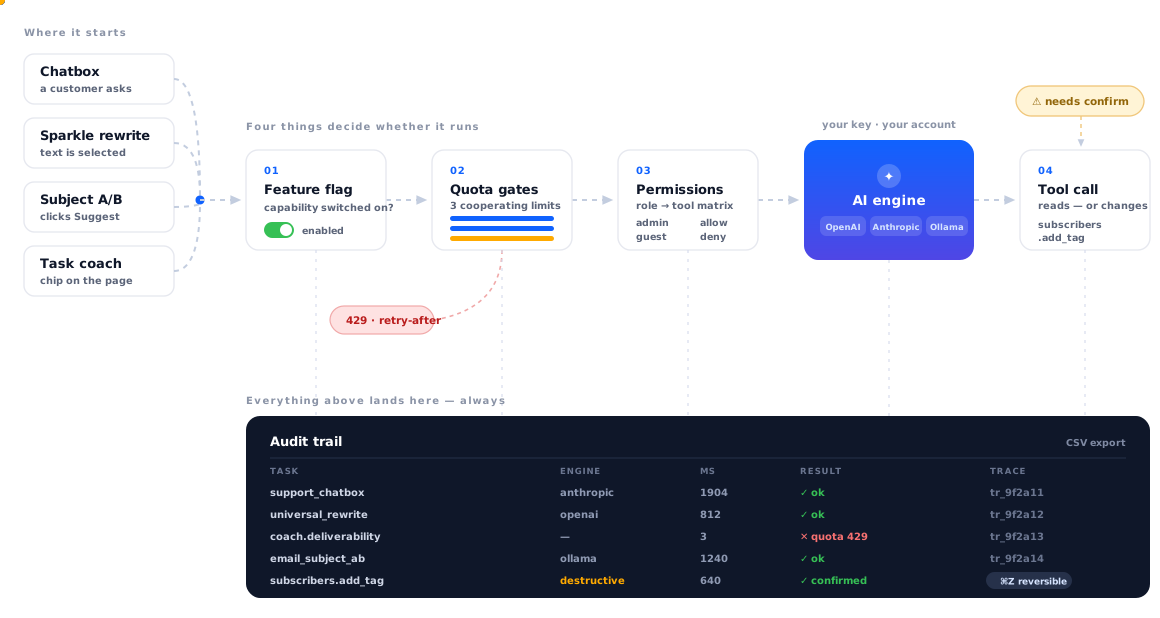
Nothing reaches the model by accident
Follow a single AI request from the moment a user triggers it to the row it leaves in your audit trail.
Built for operators who have to answer for the AI
Not a chat widget with a system prompt. Four independent layers decide whether a request runs, what it's allowed to touch, and whether you can take it back.
Capability gating
Every feature is a flag with a documented default. Off means the UI disappears and the endpoint returns 403 — so no third-party caller can reach a disabled surface.
Three cooperating gates
A per-task per-minute and per-hour limit, then a per-customer daily cap across all tasks, then whatever your provider enforces. First gate to say no stops the run with a retry-after hint.
Confirm before it changes anything
Destructive tools are declared as such and always require a click. Sensitive form fields — password, card, CVV, OTP, API key — are blocked server-side regardless of what the model asks for.
Undo, audit and tamper-evidence
A cross-tool undo stack, a full tool-call audit trail, HMAC-SHA256 checksums over the installed files, and an automatic database snapshot before every in-app update.
Requirements & supported engines
RelyAI installs as a standard AcelleMail plugin through the admin uploader. Nothing in AcelleMail core is modified, so your next core upgrade is uneventful.
System Requirements
Supported AI Engines
What does RelyAI actually add to AcelleMail?
Two things, really. For your customers: a floating chatbox that answers questions from a knowledge base, a sparkle rewrite popover on any selected text, a subject-line A/B generator in the campaign editor, and four contextual coaches. For you as the operator: six admin dashboards covering usage, conversations, tool-call audit, feedback and self-improvement, plus a settings area with feature flags, quotas, permissions, brand voice and appearance.
It installs as a normal AcelleMail plugin and doesn't fork or patch core, so it survives your core upgrades.
Do I need my own OpenAI or Anthropic API key?
Yes — and that's deliberate. RelyAI is a license, not a token reseller. You connect your own OpenAI or Anthropic key, or point it at a self-hosted Ollama instance (or Ollama Cloud), and the provider bills you directly at their rates. We never sit in the middle of your inference costs and never mark them up.
Can the AI change things in my AcelleMail without me knowing?
No. The chatbox ships read-only. Action-taking requires you to explicitly turn on the Agent chat flag, which is off by default. Even then, every tool is classified as destructive or safe, destructive tools require an in-chat confirmation click, and each one is written to a tool-call audit log with its inputs, outputs, duration and result.
Most actions are also reversible from a cross-tool undo stack — Cmd+Z in the chatbox, or an inline Undo button, within a configurable window (15 minutes by default).
How do I stop customers running up my AI bill?
Three gates. A per-task rate limit (per-minute and per-hour, keyed per user), a per-customer daily cap across all tasks, and finally whatever your provider's own limits are. You can set per-task overrides for expensive tasks and leave cheap ones on the default. The first gate that refuses returns a friendly error with a retry-after hint rather than failing silently.
You can also meter usage commercially: RelyAI renders an AI Credits card beside AcelleMail's Sending and Verification credits, so AI runs can be sold as part of a plan.
Will it match my branding and tone?
The chatbox has five colour themes, four launcher positions, ten launcher glyphs and three unread-dot behaviours. Everything else pulls from AcelleMail's own CSS custom properties, so dark mode and any re-skin you've done propagate automatically.
Tone is handled separately by Brand Voice: adjectives, forbidden words and a voice sample, resolved across three tiers — per-user override, your global default, then the shipped defaults. Forbidden words are stripped after generation, not merely discouraged in the prompt.
What stops the assistant from inventing answers or fake links?
The chatbox is instructed to answer from the bundled knowledge base, to say when it doesn't know, and never to claim it performed an action it didn't. On top of the prompt there's a URL sanitiser with an allow-list, so a fabricated link doesn't reach the user. The Self-Improve dashboard then tracks hallucinated URLs, failure clusters and knowledge-base gaps so you can see where the assistant is weak instead of guessing.
Can the agent read passwords or card details off the page?
No. The UI co-pilot tools can read and fill form fields, but filling always requires a user confirmation, and password, card number, CVV, OTP and API-key fields are hard-blocked on the server — the block doesn't depend on the model behaving.
What are the four coaches, and where do they appear?
Deliverability, Segment, Campaign and Form. Each shows up as a small launcher chip on the page where it's relevant — sending settings, the segment builder, the campaign editor, the form builder — and returns a short list of tips with a confidence score. The campaign coach, for example, flags spam-trigger words, preheader patterns, send-time windows and A/B split maths.
How do I install and activate it?
In AcelleMail admin, go to Admin → Plugins → Upload Plugin and upload the release zip, then click Activate. Open RelyAI → Settings → License, paste your key and activate it, then open Settings → Engines & Keys and connect a provider. Database migrations run automatically on activation. AI features unlock once the license is active and an engine is configured.
How do updates work?
RelyAI checks for new releases and shows an alert in the admin with the rendered release notes. Click Update now and it downloads and installs in place. Before applying, it writes a snapshot of the plugin's own configuration tables — settings, engines, feature flags and checksums — to a deny-all backup directory, keeping the three most recent. Telemetry tables are deliberately excluded, so the snapshot stays small.
What happens if my license lapses?
Your installed version keeps working. What an expired plan blocks is installing new releases and access to support. A Lifetime license is perpetual — it never stops working — and includes twelve months of updates; you can renew the updates plan later if you want newer releases.
Do you offer support, and where are you based?
Yes. All licenses include email and ticket support; Lifetime licenses get priority response. We're Relyweb Technologies Private Limited, a registered Indian company based in Ahmedabad — we issue proper GST invoices, and support is provided in English and Hindi.
Release history
What’s new in Flint — newest first.
v3.0.0 08 Sep 2026 Latest
Improvements
- The software has been updated to the final, stable version.
- Security updates have been applied to address multiple identified vulnerabilities.
- The system now includes improved license, update, and integrity management.
Fixed
- AI controller functionality has been updated to include consumption and refund handling.
Related apps
Other Relyweb apps that fit alongside Flint.
Relyagent
Plug WHMCS into Claude, Cursor, or any MCP-aware AI agent.
Razorpay Payment Gateway
Razorpay integration with subscription billing for Acellemail.
Cashfree Payment Gateway
Cashfree checkout for Acellemail subscriptions and one-time plans.
Give your AcelleMail an assistant worth trusting.
Install in minutes, connect your own AI key, and turn on only the capabilities you want your customers to have.